Tag: design thinking

  • Effective Ideation Techniques to Spark Creativity

    Photo by Pixabay on Pexels.com

    Have you ever tried to come up with something new— an idea, design, or opportunity— to feel like you keep drawing blanks? Like your brain simply isn’t doing what it needs to do? No matter how hard you try, you just feel stuck? It’s not just you. Most of us have faced this situation once or twice. Here are some ideation techniques to help spark new ideas, or at the least, get some wheels turning so you can start making progress.

    What is Ideation?

    According to Interactive Design Foundation, ideation is at the heart of the design thinking process. There are literally hundreds of ideation techniques, such as brainstorming, brain-dumping, sketching, SCAMPER, and prototyping. Ideation involves taking ideas from your conscious and subconscious mind, to come up with the best solution. In other words, let your mind run wild! Let’s discuss a few techniques in detail.

    Brainstorming

    Brainstorming is probably the most common ideation technique. I can think back to my early school years and remember my teachers introducing this concept. In my eyes, I’ve always just thought of it as a fancy term for bouncing ideas around (by yourself or with others), to come up with a solution. During a brainstorm, you should be able to share ideas without fear of judgement.

    Sketching

    Sketching is a great way to bring ideas to life. Visuals sometimes help come up with new ideas a bit better than words do. Your sketches don’t have to be pretty, or well-thought out. It’s actually better if they’re messier and rough, as it leaves room for further development and improvement. Sketches are also great for sharing ideas with others.

    Analogies

    Using analogies to spark new ideas is exactly what it sounds like. The idea is to come up with similar situations or concepts, and build off of ideas that pop up. To me, using analogies sounded a bit weird and like it could be considered copying, but some designers believe that “all design is re-design.”

    Ideation on Nike Training Club App

    I wanted to see the above techniques in action, and decided to use them to come up with new ideas for a few different workout apps. I analyzed and compared three different workout apps and created two POV statements for each, after I collected enough data on user experiences. Then, I brainstormed, sketched, and analyzed each POV statement to try to come up with an idea to solve each statement.

    The Nike Training app for example, had some issues with users feeling like it wasn’t beginner friendly. Users also wanted a way to track their previous workouts in a calendar form to stay organized and even plan future workouts.

    POV Statement: Users who like to plan their workouts need a calendar feature to view their history and future workouts because there’s no way to see what they’ve completed, or the ability to track progress.

    And here were my 3 different ideation techniques in action:
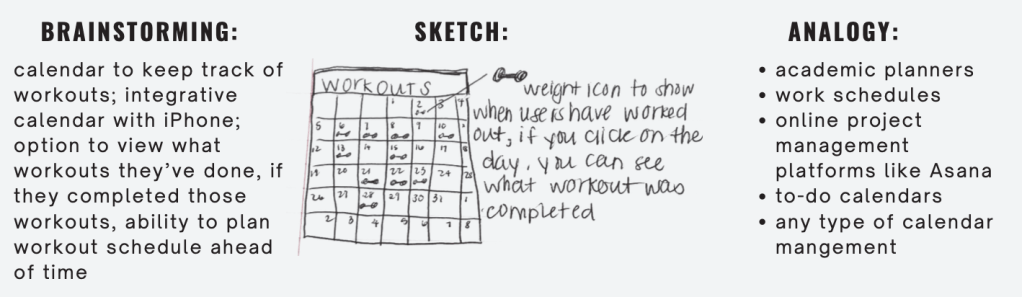
    Notice how they differ? And how each technique comes up with different ideas? Off of one POV statement, I was able to build 5+ new ideas using just three techniques.

    Try some of these new techniques if you’re feeling stuck, and I can almost guarantee that you’ll come up with something new. If you’d like to look more into my presentation on ideation techniques on my POV statements from last week, see below.

  • Enhancing the 3+1 Graduate Student Experience at QU through Design Thinking

    Design thinking helps us create innovative solutions to problems while keeping humans as the main focus. Being a college student can come with pros and cons in different areas, such as curriculum, types of learning, workload, professors, and more. As a student at QU, I was tasked with meeting with a classmate to learn about their unique experience at Quinnipiac. After interviewing them, the goal was to come up with a solution to whatever problem they were facing. It was crucial to follow the process of design thinking.

    My partner, Lindsey, is a 3+1 student at Quinnipiac. She’s finishing her final year as a graduate student at only 21 years old. By the end of the program, she’ll have a bachelor’s degree and a master’s degree. Lindsey has been a student at Quinnipiac for much longer than I have, so I felt she was very “in the know” about what needed improvement. Since Lindsey is in the ICM program, the graduate portion is done remotely. This is different from the 40+ other graduate programs at QU, which happen to be held in person.

    Empathize

    Since this was our first time meeting, we gave each other a quick summary of our education, what we planned to do with our future, and what our lives currently looked like. I couldn’t believe how much work Lindsey had completed in school thus far. I asked how she had managed her time so well — at one point, she was taking 7 classes in one semester! The key to managing her time was to time block and plan for everything. She’d schedule time for homework, dinner, and even when she wanted to take time away from school to go on a walk with friends.

    Lindsey works best in a loud environment. Her favorite place to study was the student center at QU. Her friends always knew how to find her, because she’d always be there. The library was always too quiet. She said one of the things that helped her most while in school, was being surrounded by like-minded students who were in the same program. It helped being around other people who were working towards the same goal. Lindsey explained how she made some of her best friends at school during this time.

    The main issue that I kept picking up on, was the fact that she missed being in a college environment with her friends. She felt like she was missing out every time she’d get a text or video of her friends showing her what they were up to. Because Lindsey is in the 3+1 program, and her final year is the graduate school portion, she’s finishing her degree(s) at home. Whereas her friends who are completing their bachelor’s in 4 years, are still at school. I immediately wanted to figure out how we could bring Quinnipiac to Lindsey, for her fourth year. How do we make her feel included, motivated, and like she’s having the same 4-year college experience as her friends?

    Define

    The remote (communications) graduate program is a challenge for Lindsey because she’s used to an in-person learning environment and college experience.

    HMW: How might we ensure that 3+1 students in remote graduate programs still have the quintessential, 4-year experience that undergraduates have [had]?

    Ideate

    I knew that first and foremost, human interaction was very important for Lindsey. I started thinking of ways to bring QU to Long Island, where Lindsey was completing her degree. Or, how do we bring Lindsey to QU (without actually bringing her there)?

    I knew that it wasn’t realistic for Lindsey to move back to school, either. And the same goes for many other grad students. I also thought of sports events or other things that might bring people together. But we still faced the fact that Lindsey was hours away.

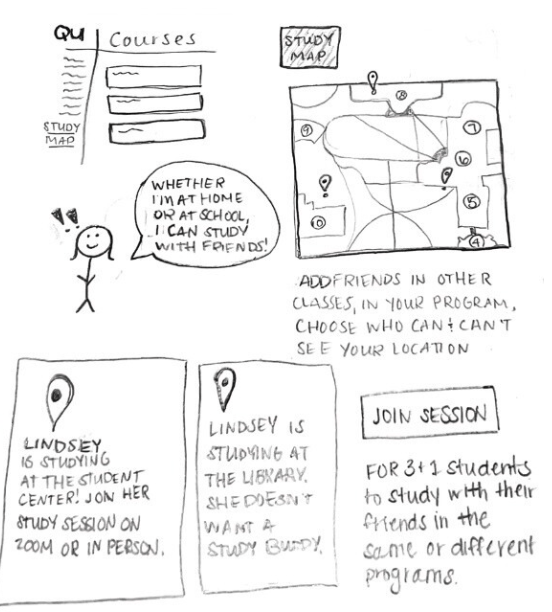
    As you’ll see in my presentation below, once Lindsey and I reviewed a few of my ideas, we decided that the best option would have a co-work type of vibe, and would allow students who were at school or working online, to be able to study together or just hang-out over Zoom.

    Prototype

    I wanted to create a program that would be accessible on Blackboard, as that’s a platform that many college students already use. I thought of creating a “Study Map” option, where students could see where their classmates were studying. You’d be able to make your location available to whoever you choose. There’d be an option to send invites (or, “e-vites”) to ask your friends to study with you. It would be available for graduate students, undergraduates, students living on campus, and remote learners. To make it more unique, especially for the remote students, there would be an option to add a VR background to their zooms, to make it feel like they were on campus at QU.

    Test

    Overall, Lindsey liked the idea. She thought the campus map was cool, and liked the interactive features that showed if the person does or doesn’t want to co-work. This way, you wouldn’t disturb others if they want to complete work alone. She thought it might be a good idea to create this outside of Blackboard, but understood why it could work. It might be easier to share assignments/due dates/information if everything was on the same platform.

    This idea isn’t perfect and could go through lots of re-runs within the design thinking process. But isn’t that the point? Doing this assignment helped me further understand what design thinking is, and how it differs from other problem-solving processes.

    If you’d like to take a look at my presentation, it’s embedded below: