No, I’m not sponsored by Notion. I just love it.
What’s Notion?
If you’re unfamiliar with Notion or other project management tools, you’re missing out. They can be used for anything and everything — especially when it comes to juggling multiple projects at once, which is exactly what I’m doing right now. With Notion, you can create templates to make to-do lists, calendar appointments, track deadlines, or even do fun things, like cross things off your bucket list. It’s completely customizable, has clean UX/UI, and makes the user feel accomplished when they cross something off their list. I’ve even know people who’ve made templates to track what books they’ve read, how they rated them, and any more information they wanted to include in one sheet. The possibilities are endless.
Using Notion to Organize my LinkedIn Project
In this instance, I’m using Notion to organize my LinkedIn project for the next six weeks. Each week, I’ll be writing an article on LinkedIn, discussing different gaps and inequalities in women’s sports vs. men’s sports. Since I want to work in sports media and stay in the WNBA world, it’s important that I become a thought leader in the industry, and this is one of the ways I can do that.

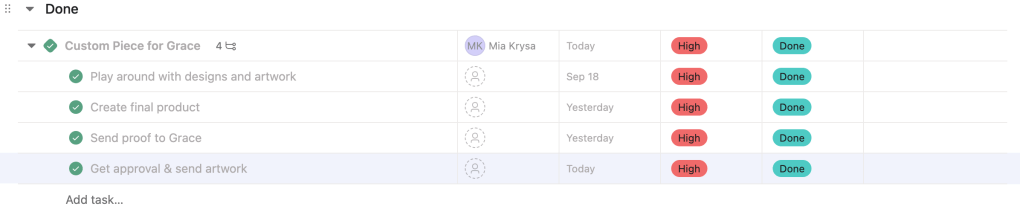
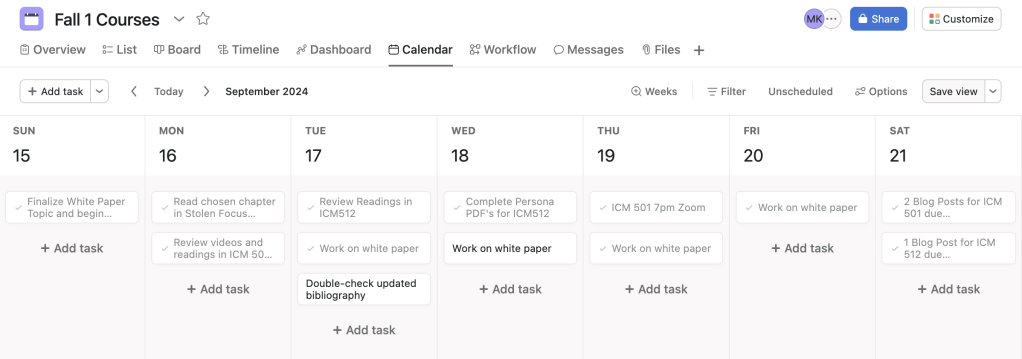
I organized each week like the photo above, and included due dates, status updates, and tags, so I could keep track of each assignment. In each task, users have the ability to expand and create another template. For mine, I chose to list smaller tasks that I could cross off throughout the week. At the end of each week, my subtasks should look like this:

I plan on checking into Notion each day to stay on top of my studies. Plus — this is one class, and I’m also completing my master’s capstone at the same time. It’s safe to say that my plate is full.
This week, I also annotated my bibliography with the current sources I have. I plan on starting to write my first article as well, just because this class happens in such a short period of time, I’d like to get ahead of schedule. I love to write, so this isn’t an issue for me. For this project, I picked something that I genuinely enjoy, but also in an area where I know I have some work to do (my LinkedIn presence), and establishing leadership.
Updating my Profile
This past week on LinkedIn, I tried updating my profile to the best of my ability. In one of the videos I cited in my bibliography, Tommy Clark spoke about how important it is to have a clean, concise, and clear presence. In other words, who are you, and what problem are you solving? Why should someone in your target audience follow you on LinkedIn? You don’t have to have a long bio, or try to answer multiple questions at once. Keep it simple. If I’m going to post an article each week on LinkedIn, and I want people to engage with my profile and my posts, my profile has to look top-tier. I updated my profile picture, bio, and headline. I’m starting this experiment with 265 connections, and I’m hoping to reach at least 100 more.

Stay tuned for my first article next week! Connect with me here.

 Mia Krysa